Introduction to MCP in ArcGIS Enterprise
This page introduces the Model Context Protocol (MCP) and describes how ArcGIS Enterprise uses it to expose authoritative GIS capabilities to AI applications and agents. By the end of this topic, you will understand what MCP is, how it fits into the ArcGIS Enterprise architecture, and which tools are available out of the box.
What is MCP?
The Model Context Protocol (MCP) is an open-source standard, introduced by Anthropic in 2024, that enables seamless, standardized connections between AI models and external data sources, tools, and systems.
Before MCP, every integration between an AI model and a new data source required a custom implementation. These integrations were expensive to build, brittle to maintain over time, and often tightly coupled to a specific model or vendor. MCP solves this problem by providing a single, universal protocol for connecting AI applications with external data and systems—replacing fragmented, one-off integrations with one consistent contract.
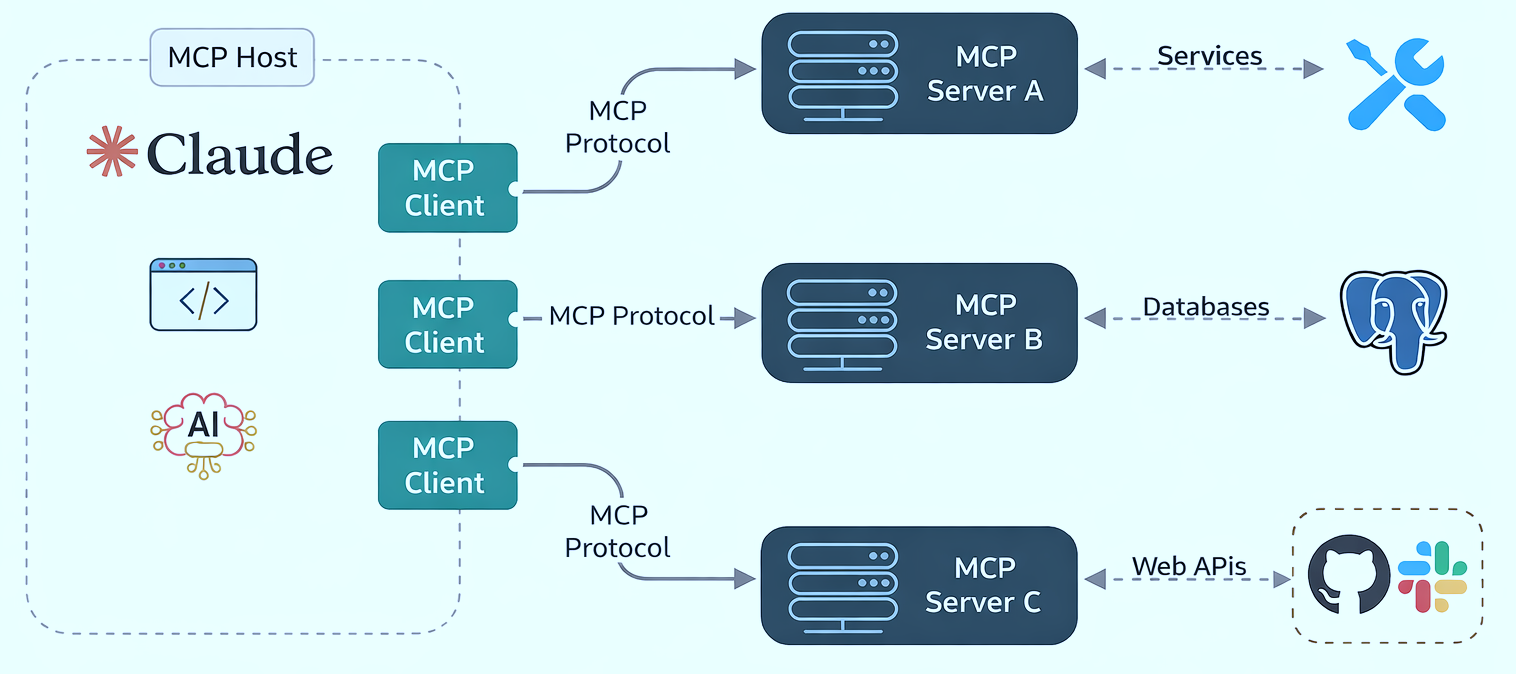
MCP follows a client–server model built around three key components:
- Host — The AI application itself, such as Claude, ChatGPT, Cursor, or any other agent-style experience.
- MCP Client — A component inside the host that manages a one-to-one connection with an external MCP server.
- MCP Server — A separate component that provides context, tools, and prompts to clients, exposing specific capabilities through the standardized protocol.
Learn more For a deeper introduction to MCP, see the official documentation at modelcontextprotocol.io.
How MCP fits into ArcGIS Enterprise
In the context of ArcGIS Enterprise, MCP acts as a structured integration layer that allows AI applications to safely discover and invoke ArcGIS capabilities.
With MCP, an AI application can do three important things in a consistent way:
- Discover the GIS capabilities that are available—for example, content search, geocoding, routing, and analysis tools.
- Describe authoritative GIS context and data, including layer schemas, service capabilities, and other information that helps AI applications use ArcGIS capabilities correctly.
- Invoke the available GIS capabilities with predictable inputs and render the results.
This discover → describe → invoke pattern is the foundation for how AI applications interact with the GIS capabilities exposed by ArcGIS Enterprise. MCP is the mechanism that lets AI applications and agents call ArcGIS capabilities as tools, instead of treating GIS like a black-box API.
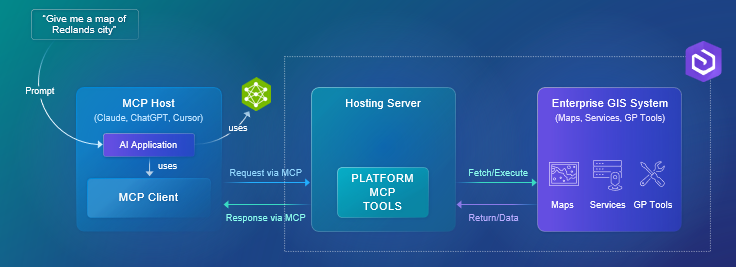
In the diagram above:
- On the right is the Enterprise GIS system, with maps, services, and geoprocessing tools.
- In the middle is the MCP server. This is where ArcGIS exposes selected GIS capabilities as discoverable MCP tools—for example, geocoding, querying data, or running spatial analysis. The important point is that these capabilities are exposed as tools with schemas, not just raw REST endpoints.
- On the left are AI applications and hosts, such as Claude, ChatGPT, Cursor, and Copilot Studio. These systems can discover and invoke ArcGIS tools through MCP whenever a prompt requires geospatial reasoning.
When a user asks something like Give me a map of Redlands, the AI does not have to guess. It recognizes that the request requires a GIS operation, calls the appropriate ArcGIS tool through MCP, and returns authoritative results.
Note Because MCP catalog hosted in ArcGIS Enterprise, it respects enterprise security, permissions, and governance—the same trust model your organization already relies on for GIS.
Available MCP tools
ArcGIS Enterprise ships with a built-in catalog of MCP tools, organized into four capability areas:
- Content and data — Search the portal for items, describe items and layers, and query records. Tools: Search Portal Content, Describe Item, Describe Layer, Query Data (plus Get Search Portal Content Passthrough Instructions for advanced search queries).
- Mapping — Render static map images for screen, print, or vector editing. Tools: Get Map Image.
- Location services — Geocode an address, reverse-geocode coordinates, and solve routes between locations. Tools: Find Address Candidates, Reverse Geocode, Solve Route.
- Geoprocessing — Inspect geoprocessing task definitions and check the status of asynchronous jobs. Tools: Get GP Task Definition, Get GP Task Job Status.
For the full list of tools—each with its canonical name, alias, description, schema, and sample prompts—see the Tool Catalog.
Tip These tools ship with every ArcGIS Enterprise deployment that has MCP enabled.